SpringSecurity

Spring Security(旧)

SpringSecurity是一个强大的可高度定制的认证和授权框架,对于Spring应用来说它是一套Web安全标准

流程
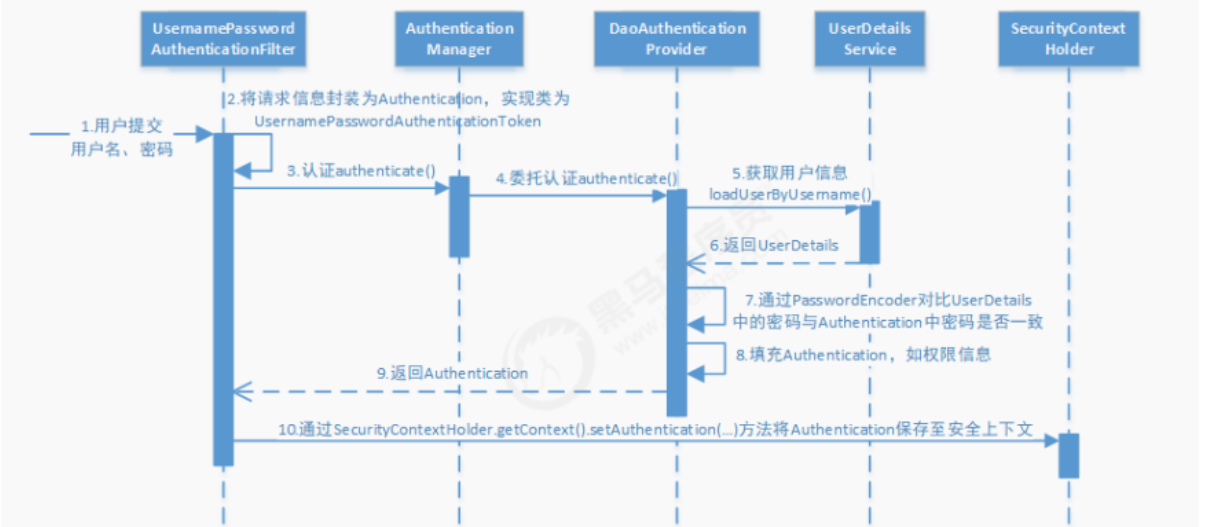
认证流程

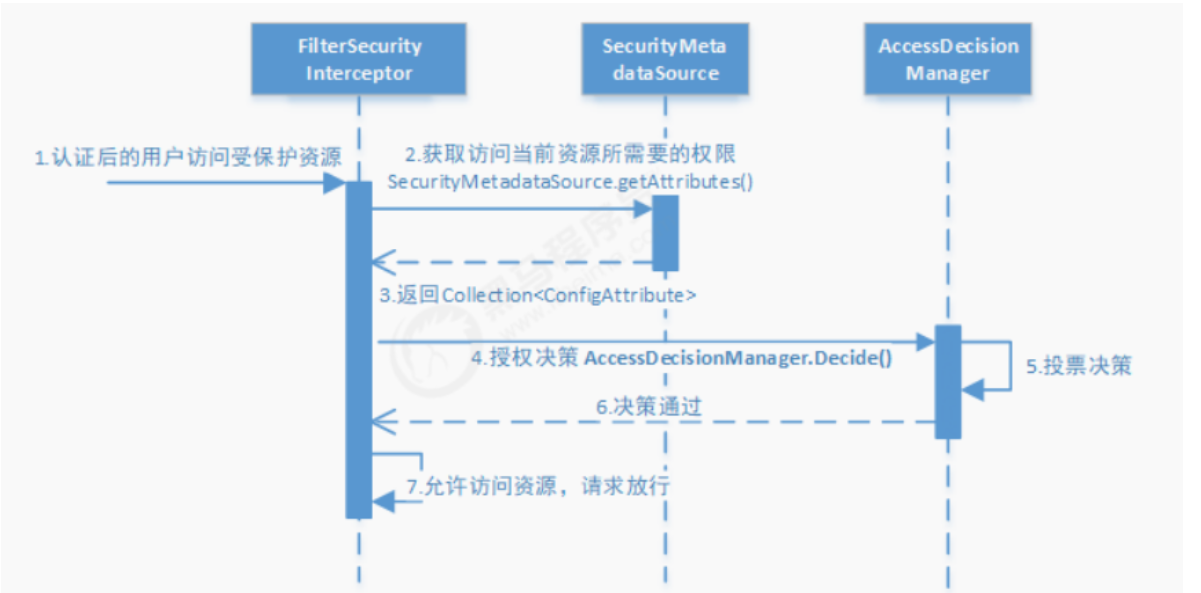
鉴权流程

使用

  1. 导入坐标

    1
    2
    3
    4
    5
    6
    7
    8
    9
    10
    11
    <!--SpringSecurity-->
    <dependency>
    <groupId>org.springframework.boot</groupId>
    <artifactId>spring-boot-starter-security</artifactId>
    </dependency>
    <!--JWT-->
    <dependency>
    <groupId>io.jsonwebtoken</groupId>
    <artifactId>jjwt</artifactId>
    <version>0.9.1</version>
    </dependency>
  2. 编写SpringSecurity配置类

    主要配置:需要鉴权的访问路径、获取用户信息方式、密码认证方式、认证token方式、自定义未授权和未登录结果的返回

    1
    2
    3
    4
    5
    6
    7
    8
    9
    10
    11
    12
    13
    14
    15
    16
    17
    18
    19
    20
    21
    22
    23
    24
    25
    26
    27
    28
    29
    30
    31
    32
    33
    34
    35
    36
    37
    38
    39
    40
    41
    42
    43
    44
    45
    46
    47
    48
    49
    50
    51
    52
    53
    54
    55
    56
    57
    58
    59
    60
    61
    62
    63
    64
    65
    66
    67
    68
    69
    70
    71
    72
    73
    74
    75
    76
    77
    78
    79
    80
    81
    82
    83
    84
    85
    86
    87
    88
    89
    90
    @Configuration
    @EnableWebSecurity
    @EnableGlobalMethodSecurity(prePostEnabled = true)
    public class SecurityConfig extends WebSecurityConfigurerAdapter {

    @Lazy // 防止嵌套
    @Autowired
    private IUmsAdminService adminService;
    @Resource
    private RestfulAccessDeniedHandler restfulAccessDeniedHandler;
    @Resource
    private RestAuthenticationEntryPoint restAuthenticationEntryPoint;

    // 用于配置需要拦截的url路径、jwt过滤器及出异常后的处理器
    @Override
    protected void configure(HttpSecurity httpSecurity) throws Exception {
    httpSecurity.csrf()
    .disable()
    .sessionManagement()// 基于token,所以不需要session
    .sessionCreationPolicy(SessionCreationPolicy.STATELESS)
    .and()
    .authorizeRequests()
    .antMatchers(HttpMethod.GET, // 允许对于网站静态资源的无授权访问
    "/",
    "/*.html",
    "/favicon.ico",
    "/**/*.html",
    "/**/*.css",
    "/**/*.js",
    "/swagger-resources/**",
    "/v2/api-docs/**"
    )
    .permitAll()
    .antMatchers("/admin/login", "/admin/register")// 对登录注册要允许匿名访问
    .permitAll()
    .antMatchers(HttpMethod.OPTIONS)//跨域请求会先进行一次options请求
    .permitAll()
    // .antMatchers("/**")//测试时全部运行访问
    // .permitAll()
    .anyRequest()// 除上面外的所有请求全部需要鉴权认证
    .authenticated();
    // 禁用缓存
    httpSecurity.headers().cacheControl();
    // 添加JWT filter
    httpSecurity.addFilterBefore(jwtAuthenticationTokenFilter(), UsernamePasswordAuthenticationFilter.class);
    // 添加自定义未授权和未登录结果返回
    httpSecurity.exceptionHandling()
    .accessDeniedHandler(restfulAccessDeniedHandler)
    .authenticationEntryPoint(restAuthenticationEntryPoint);
    }

    // 用于配置UserDetailsService及PasswordEncoder
    @Override
    protected void configure(AuthenticationManagerBuilder auth) throws Exception {
    auth.userDetailsService(userDetailsService())
    .passwordEncoder(passwordEncoder());
    }

    // SpringSecurity定义的用于对密码进行编码及比对的接口
    @Bean
    public PasswordEncoder passwordEncoder() {
    return new BCryptPasswordEncoder();
    }

    // 用于根据用户名获取用户信息
    @Bean
    public UserDetailsService userDetailsService() {
    //获取登录用户信息
    return username -> {
    UmsAdmin admin = adminService.getAdminByUsername(username);
    if (admin != null) {
    List<UmsPermission> permissionList = adminService.getPermissionList(admin.getId());
    return new AdminUserDetails(admin,permissionList);
    }
    throw new UsernameNotFoundException("用户名或密码错误");
    };
    }

    // 在用户名和密码校验前添加的过滤器
    @Bean
    public JwtAuthenticationTokenFilter jwtAuthenticationTokenFilter(){
    return new JwtAuthenticationTokenFilter();
    }

    @Bean
    @Override
    public AuthenticationManager authenticationManagerBean() throws Exception {
    return super.authenticationManagerBean();
    }
    }
    1
    2
    3
    4
    5
    6
    7
    8
    9
    10
    11
    12
    13
    /**
    * 当访问接口没有权限时,自定义的返回结果
    */
    @Component
    public class RestfulAccessDeniedHandler implements AccessDeniedHandler {
    @Override
    public void handle(HttpServletRequest request, HttpServletResponse response, AccessDeniedException e) throws IOException, ServletException {
    response.setCharacterEncoding("UTF-8");
    response.setContentType("application/json");
    response.getWriter().println(JSONUtil.parse(CommonResult.forbidden(e.getMessage())));
    response.getWriter().flush();
    }
    }
    1
    2
    3
    4
    5
    6
    7
    8
    9
    10
    11
    12
    13
    14
    /**
    * 当未登录或者token失效访问接口时,自定义的返回结果
    */
    @Component
    public class RestAuthenticationEntryPoint implements AuthenticationEntryPoint {
    @Override
    public void commence(HttpServletRequest request, HttpServletResponse response, AuthenticationException authException) throws IOException, ServletException {
    response.setCharacterEncoding("UTF-8");
    response.setContentType("application/json");
    response.getWriter().println(JSONUtil.parse(CommonResult.unauthorized(authException.getMessage())));
    response.getWriter().flush();
    }
    }

    自定义的用户信息类

    1
    2
    3
    4
    5
    6
    7
    8
    9
    10
    11
    12
    13
    14
    15
    16
    17
    18
    19
    20
    21
    22
    23
    24
    25
    26
    27
    28
    29
    30
    31
    32
    33
    34
    35
    36
    37
    38
    39
    40
    41
    42
    43
    44
    45
    46
    47
    48
    public class AdminUserDetails implements UserDetails {
    private UmsAdmin umsAdmin;
    private List<UmsPermission> permissionList;

    public AdminUserDetails(UmsAdmin umsAdmin, List<UmsPermission> permissionList) {
    this.umsAdmin = umsAdmin;
    this.permissionList = permissionList;
    }

    @Override
    public Collection<? extends GrantedAuthority> getAuthorities() {
    // 获取当前用户权限
    return permissionList.stream()
    .filter(permissionList -> permissionList.getValue() != null)
    .map(permission -> new SimpleGrantedAuthority(permission.getValue()))
    .collect(Collectors.toList());
    }

    @Override
    public String getPassword() {
    return umsAdmin.getPassword();
    }

    @Override
    public String getUsername() {
    return umsAdmin.getUsername();
    }

    @Override
    public boolean isAccountNonExpired() {
    return true;
    }

    @Override
    public boolean isAccountNonLocked() {
    return true;
    }

    @Override
    public boolean isCredentialsNonExpired() {
    return true;
    }

    @Override
    public boolean isEnabled() {
    return umsAdmin.getStatus().equals(1);
    }
    }

    验证token

    1
    2
    3
    4
    5
    6
    7
    8
    9
    10
    11
    12
    13
    14
    15
    16
    17
    18
    19
    20
    21
    22
    23
    24
    25
    26
    27
    28
    29
    30
    31
    32
    33
    public class JwtAuthenticationTokenFilter extends OncePerRequestFilter {
    private static final Logger LOGGER = LoggerFactory.getLogger(JwtAuthenticationTokenFilter.class);
    @Resource
    private UserDetailsService userDetailsService;
    @Resource
    private JwtTokenUtil jwtTokenUtil;
    @Value("${jwt.tokenHeader}")
    private String tokenHeader; // Authorization
    @Value("${jwt.tokenHead}")
    private String tokenHead; // Bearer

    @Override
    protected void doFilterInternal(HttpServletRequest request,
    HttpServletResponse response,
    FilterChain chain) throws ServletException, IOException {
    String authHeader = request.getHeader(this.tokenHeader);
    if (authHeader != null && authHeader.startsWith(this.tokenHead)) {
    String authToken = authHeader.substring(this.tokenHead.length());// The part after "Bearer "
    String username = jwtTokenUtil.getUserNameFromToken(authToken);
    LOGGER.info("checking username:{}", username);
    if (username != null && SecurityContextHolder.getContext().getAuthentication() == null) {
    UserDetails userDetails = this.userDetailsService.loadUserByUsername(username);
    if (jwtTokenUtil.validateToken(authToken, userDetails)) {
    UsernamePasswordAuthenticationToken authentication = new UsernamePasswordAuthenticationToken(userDetails, null, userDetails.getAuthorities());
    authentication.setDetails(new WebAuthenticationDetailsSource().buildDetails(request));
    LOGGER.info("authenticated user:{}", username);
    SecurityContextHolder.getContext().setAuthentication(authentication);
    }
    }
    }
    chain.doFilter(request, response);
    }
    }
  3. 使用

    1
    2
    // 在需要鉴权的方法上添加
    @PreAuthorize("hasAuthority('pms:brand:read')")
  4. 注意

    如果使用了swagger
    在配置Docket时
    securitySchemes要传入需要登录认证的路径,否则不会主动带上头信息

    1
    2
    3
    4
    5
    6
    7
    8
    private List<SecurityContext> securityContexts() {
    //设置需要登录认证的路径
    List<SecurityContext> result = new ArrayList<>();
    result.add(getContextByPath("/brand/.*"));
    result.add(getContextByPath("/admin/.*"));
    result.add(getContextByPath("/esProduct/.*"));
    return result;
    }

实例

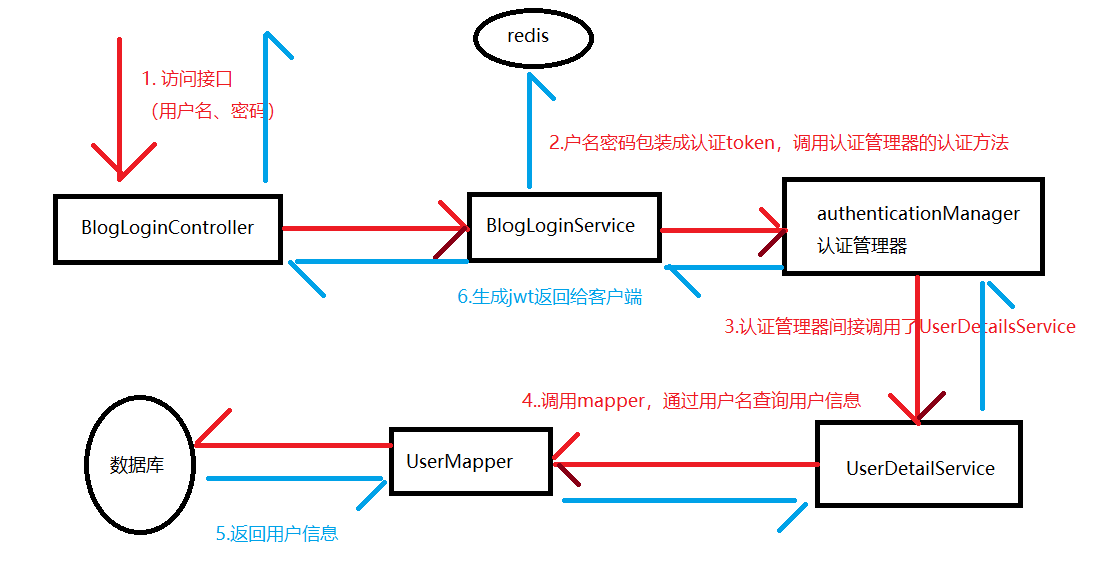
场景:前端传来用户名和密码,后台认证后返回token并把用户信息存到redis中

1
2
3
4
{
"userName": "xw",
"password": "1234"
}
1
2
3
4
5
6
7
8
9
10
11
12
13
14
{
"code": 200,
"data": {
"token": "eyJhbGciOiJIUzI1NiJ9.eyJqdGkiOiI3YTgzYmM3NGNjOTQ0ZDgxOTExZjQ3YTgxMGYyMTk2MiIsInN1YiI6IjEiLCJpc3MiOiJ4dyIsImlhdCI6MTY3ODk1NDk2NiwiZXhwIjoxNjc5MDQxMzY2fQ.OqHhpCJBQX_L5pMTWexnm23DJ69tIPMyETSNMAji0b8",
"userInfoVo": {
"avatar": "https://gimg2.baidu.com/image_search/src=http%3A%2F%2Fi0.hdslb.com%2Fbfs%2Farticle%2F3bf9c263bc0f2ac5c3a7feb9e218d07475573ec8.gi",
"email": "23412332@qq.com",
"id": "1",
"nickName": "xw123",
"sex": "1"
}
},
"msg": "操作成功"
}

登录

流程

Entity

User,映射数据库表

1
2
3
4
5
6
7
8
9
10
11
12
13
14
15
16
17
18
19
20
21
22
23
24
25
26
27
28
29
30
31
32
33
34
35
36
@Data
@NoArgsConstructor
@AllArgsConstructor
@TableName("sys_user")
public class User implements Serializable {
//主键
private Long id;
//用户名
private String userName;
//昵称
private String nickName;
//密码
private String password;
//用户类型:0代表普通用户,1代表管理员
private String type;
//账号状态(0正常 1停用)
private String status;
//邮箱
private String email;
//手机号
private String phonenumber;
//用户性别(0男,1女,2未知)
private String sex;
//头像
private String avatar;
//创建人的用户id
private Long createBy;
//创建时间
private Date createTime;
//更新人
private Long updateBy;
//更新时间
private Date updateTime;
//删除标志(0代表未删除,1代表已删除)
private Integer delFlag;
}

实现UserDetails

1
2
3
4
5
6
7
8
9
10
11
12
13
14
15
16
17
18
19
20
21
22
23
24
25
26
27
28
29
30
31
32
33
34
35
36
37
38
39
40
41
42
@Data
@NoArgsConstructor
@AllArgsConstructor
public class LoginUser implements UserDetails {

private User user;

@Override
public Collection<? extends GrantedAuthority> getAuthorities() {
return null;
}

@Override
public String getPassword() {
return user.getPassword();
}

@Override
public String getUsername() {
return user.getUserName();
}

@Override
public boolean isAccountNonExpired() {
return true;
}

@Override
public boolean isAccountNonLocked() {
return true;
}

@Override
public boolean isCredentialsNonExpired() {
return true;
}

@Override
public boolean isEnabled() {
return true;
}
}

BlogUserLoginVo,返回前端的Vo

1
2
3
4
5
6
7
8
9
@Data
@AllArgsConstructor
@NoArgsConstructor
public class BlogUserLoginVo {

private String token;

private UserInfoVo userInfoVo;
}
1
2
3
4
5
6
7
8
9
10
11
12
13
14
15
16
17
18
19
20
21
22
23
24
@Data
@Accessors(chain = true)
public class UserInfoVo {
/**
* 主键
*/
private Long id;

/**
* 昵称
*/
private String nickName;

/**
* 头像
*/
private String avatar;

private String sex;

private String email;


}
实现UserDetailsService

用于查询用户信息,返回UserDetails,被AuthenticationManager所调用

1
2
3
4
5
6
7
8
9
10
11
12
13
14
15
16
17
18
19
20
21
22
23
24
/**
* 获取用户身份信息的方法,替换默认的SpringSecurity的获取身份信息方式
*/
@Service
public class UserDetailServiceImpl implements UserDetailsService {

@Resource
private UserMapper userMapper;

@Override
public UserDetails loadUserByUsername(String username) throws UsernameNotFoundException {
// 根据用户名查询用户信息
User user = userMapper.selectOne(new LambdaQueryWrapper<User>()
.eq(User::getUserName, username));
if (Objects.isNull(user)) {
throw new RuntimeException("账号或密码错误");
}

// TODO 查询用户权限信息

// 返回用户信息
return new LoginUser(user);
}
}
SpringSecurity配置类
1
2
3
4
5
6
7
8
9
10
11
12
13
14
15
16
17
18
19
20
21
22
23
24
25
26
27
28
29
30
31
32
33
@Configuration
public class SecurityConfig extends WebSecurityConfigurerAdapter {

@Override
protected void configure(HttpSecurity http) throws Exception {
http
// 关闭csrf防范
.csrf().disable()
// 不通过Session获取SecurityContext
.sessionManagement().sessionCreationPolicy(SessionCreationPolicy.STATELESS)
.and()
.authorizeRequests()
// 允许匿名访问的接口
.antMatchers("/login").anonymous()
.anyRequest().permitAll();
http.logout().disable();
// 允许跨域
http.cors();
}

// 密码编码器
@Bean
public PasswordEncoder passwordEncoder() {
return new BCryptPasswordEncoder();
}

// 注入身份认证器
@Override
@Bean
public AuthenticationManager authenticationManagerBean() throws Exception {
return super.authenticationManagerBean();
}
}
Service层

通过身份认证器进行身份验证

1
2
3
4
5
6
7
8
9
10
11
12
13
14
15
16
17
18
19
20
21
22
23
24
25
26
27
28
29
30
31
@Service
public class BlogLoginServiceImpl implements BlogLoginService {

@Resource
private AuthenticationManager authenticationManager;

@Resource
private RedisCache redisCache;

@Override
public ResponseResult login(User user) {
// 创建用于用户身份认证的token
UsernamePasswordAuthenticationToken authenticationToken = new UsernamePasswordAuthenticationToken(user.getUserName(), user.getPassword());
// 调用Manager的身份认证方法实现认证
Authentication authenticate = authenticationManager.authenticate(authenticationToken);
if (Objects.isNull(authenticate)) {
throw new RuntimeException("用户名或密码异常");
}
// 通过用户id生成jwt
LoginUser loginUser = (LoginUser) authenticate.getPrincipal();
String id = String.valueOf(loginUser.getUser().getId());
String jwt = JwtUtil.createJWT(id);
// 存入redis
redisCache.setCacheObject(RedisConstants.CACHE_LOGIN_PREFIX + id, loginUser, RedisConstants.CACHE_TTL, TimeUnit.SECONDS);

// 返回vo
UserInfoVo userInfoVo = BeanCopyUtils.copyBean(loginUser.getUser(), UserInfoVo.class);
BlogUserLoginVo blogUserLoginVo = new BlogUserLoginVo(jwt, userInfoVo);
return ResponseResult.okResult(blogUserLoginVo);
}
}
Controller层
1
2
3
4
5
6
7
8
9
10
11
@RestController
public class BlogLoginController {

@Resource
private BlogLoginService blogLoginService;

@PostMapping("/login")
public ResponseResult login(@RequestBody User user) {
return blogLoginService.login(user);
}
}

认证

每次发送请求时都会在响应头中带上token,通过解析token来比对redis中缓存的登录信息来认证

认证过滤器

工具类

1
2
3
4
5
6
7
8
9
10
11
12
13
14
15
16
17
18
19
20
21
22
23
24
25
26
27
28
29
30
31
32
33
/**
* 向前端返回json数据
*/
public class WebUtils {
/**
* 将字符串渲染到客户端
*
* @param response 渲染对象
* @param string 待渲染的字符串
* @return null
*/
public static void renderString(HttpServletResponse response, String string) {
try {
response.setStatus(200);
response.setContentType("application/json");
response.setCharacterEncoding("utf-8");
response.getWriter().print(string);
} catch (IOException e) {
e.printStackTrace();
}
}


public static void setDownLoadHeader(String filename, ServletContext context, HttpServletResponse response) throws UnsupportedEncodingException {
String mimeType = context.getMimeType(filename);//获取文件的mime类型
response.setHeader("content-type", mimeType);
String fname = URLEncoder.encode(filename, "UTF-8");
response.setHeader("Content-disposition", "attachment; filename=" + fname);

// response.setContentType("application/vnd.openxmlformats-officedocument.spreadsheetml.sheet");
// response.setCharacterEncoding("utf-8");
}
}

解析token

1
2
3
4
5
6
7
8
9
10
11
12
13
14
15
16
17
18
19
20
21
22
23
24
25
26
27
28
29
30
31
32
33
34
35
36
37
38
39
40
41
42
43
44
45
46
47
48
49
50
51
52
53
54
55
56
/**
* 认证过滤器
* 将用户信息保存到SecurityContextHolder
*/
@Slf4j
@Component
public class JwtAuthenticationTokenFilter extends OncePerRequestFilter {

@Resource
private RedisCache redisCache;

@Override
protected void doFilterInternal(HttpServletRequest request, HttpServletResponse response, FilterChain filterChain) throws ServletException, IOException {
String userId = null;
try {
userId = getUserIdFromRequest(request, response, filterChain);
} catch (Exception e) {
// token已过期或非法
log.info(e.getMessage());
return;
}
if (userId != null) {
// 查询redis中是否有对应用户信息
LoginUser loginUser = redisCache.getCacheObject(RedisConstants.CACHE_LOGIN_PREFIX + userId);
if (Objects.isNull(loginUser)) {
// redis中过期
ResponseResult result = ResponseResult.errorResult(AppHttpCodeEnum.NEED_LOGIN);
WebUtils.renderString(response, JSON.toJSONString(result));
return;
}
// 存入SecurityContextHolder
UsernamePasswordAuthenticationToken authenticationToken = new UsernamePasswordAuthenticationToken(loginUser, null, null);
SecurityContextHolder.getContext().setAuthentication(authenticationToken);
}
filterChain.doFilter(request, response);
}

private String getUserIdFromRequest(HttpServletRequest request, HttpServletResponse response, FilterChain filterChain) throws IOException, ServletException {
// 获取请求头中的token
String token = request.getHeader("token");
if (!StringUtils.hasText(token)) {
return null;
}
// 解析出用户id
String userId = null;
try {
Claims claims = JwtUtil.parseJWT(token);
userId = claims.getSubject();
} catch (Exception e) {
ResponseResult result = ResponseResult.errorResult(AppHttpCodeEnum.NEED_LOGIN);
WebUtils.renderString(response, JSON.toJSONString(result));
throw new RuntimeException("token非法或已过期");
}
return userId;
}
}
添加过滤器
1
2
3
4
5
6
7
8
9
10
11
12
13
14
15
16
17
18
19
20
21
22
23
24
25
// SpringSecurity配置类中注入过滤器
@Resource
private JwtAuthenticationTokenFilter authenticationTokenFilter;

// configure方法中添加过滤器到用户名密码认证前
@Override
protected void configure(HttpSecurity http) throws Exception {
http
// 关闭csrf防范
.csrf().disable()
// 不通过Session获取SecurityContext
.sessionManagement().sessionCreationPolicy(SessionCreationPolicy.STATELESS)
.and()
.authorizeRequests()
// 允许匿名访问的接口
.antMatchers("/login").anonymous()
.antMatchers("/link/getAllLink").authenticated()
// 接口都无需鉴权
.anyRequest().permitAll();
http.logout().disable();
// 添加对jwt解析的过滤器
http.addFilterBefore(authenticationTokenFilter, UsernamePasswordAuthenticationFilter.class);
// 允许跨域
http.cors();
}

自定义返回结果

1
2
3
4
5
6
7
8
9
10
11
12
13
14
15
16
17
18
19
20
/**
* 自定义认证失败返回结果
*/
@Slf4j
@Component
public class AuthenticationEntryPointImpl implements AuthenticationEntryPoint {
@Override
public void commence(HttpServletRequest request, HttpServletResponse response, AuthenticationException e) throws IOException, ServletException {
log.warn(e.getMessage());
ResponseResult result = null;
if (e instanceof BadCredentialsException) {
result = ResponseResult.errorResult(AppHttpCodeEnum.LOGIN_ERROR.getCode(), e.getMessage());
} else if (e instanceof InsufficientAuthenticationException) {
result = ResponseResult.errorResult(AppHttpCodeEnum.NEED_LOGIN.getCode(), e.getMessage());
} else {
result = ResponseResult.errorResult(AppHttpCodeEnum.SYSTEM_ERROR.getCode(), "未知错误");
}
WebUtils.renderString(response, JSON.toJSONString(result));
}
}
1
2
3
4
5
6
7
8
9
10
11
12
13
/**
* 自定义鉴权失败返回结果
*/
@Slf4j
@Component
public class AccessDeniedHandlerImpl implements AccessDeniedHandler {
@Override
public void handle(HttpServletRequest request, HttpServletResponse response, AccessDeniedException e) throws IOException, ServletException {
log.warn(e.getMessage());
ResponseResult result = ResponseResult.errorResult(AppHttpCodeEnum.NO_OPERATOR_AUTH);
WebUtils.renderString(response, JSON.toJSONString(result));
}
}

添加到配置类中

1
2
3
4
5
6
7
8
9
10
11
12
13
14
15
16
17
18
19
20
21
22
23
24
25
26
27
28
29
30
31
32
33
// 自定义认证异常处理器
@Resource
private AuthenticationEntryPointImpl authenticationEntryPoint;

// 自定义鉴权异常处理器
@Resource
private AccessDeniedHandlerImpl accessDeniedHandler;

@Override
protected void configure(HttpSecurity http) throws Exception {
http
// 关闭csrf防范
.csrf().disable()
// 不通过Session获取SecurityContext
.sessionManagement().sessionCreationPolicy(SessionCreationPolicy.STATELESS)
.and()
.authorizeRequests()
// 允许匿名访问的接口
.antMatchers("/login").anonymous()
.antMatchers("/link/getAllLink").authenticated()
// 接口都无需鉴权
.anyRequest().permitAll();
//配置异常处理器
http.exceptionHandling()
.authenticationEntryPoint(authenticationEntryPoint)
.accessDeniedHandler(accessDeniedHandler);

http.logout().disable();
// 添加对jwt的过滤器
http.addFilterBefore(authenticationTokenFilter, UsernamePasswordAuthenticationFilter.class);
// 允许跨域
http.cors();
}

全局异常处理

这里跟SpringSecurity无关

自定义异常

1
2
3
4
5
6
7
8
9
10
11
12
13
14
15
16
17
18
19
20
21
22
23
24
/**
* 自定义异常
*/
public class SystemException extends RuntimeException{

private int code;

private String msg;

public int getCode() {
return code;
}

public String getMsg() {
return msg;
}

public SystemException(AppHttpCodeEnum httpCodeEnum) {
super(httpCodeEnum.getMsg());
this.code = httpCodeEnum.getCode();
this.msg = httpCodeEnum.getMsg();
}

}

全局异常处理器

对Controller的增强

1
2
3
4
5
6
7
8
9
10
11
12
13
14
15
16
17
18
19
20
21
22
23
24
25
26
27
28
29
/**
* 全局异常处理器
*/
@RestControllerAdvice
@Slf4j
public class GlobalException {

/**
* 处理自定义异常
* @param e
* @return
*/
@ExceptionHandler(SystemException.class)
public ResponseResult systemExceptionHandler(SystemException e) {
log.error("出现了异常:{}", e.getMsg());
return ResponseResult.errorResult(e.getCode(), e.getMsg());
}

/**
* 处理其他异常
* @param e
* @return
*/
@ExceptionHandler(Exception.class)
public ResponseResult exceptionHandler(Exception e) {
log.error("出现了异常:{}", e.getMessage());
return ResponseResult.errorResult(AppHttpCodeEnum.SYSTEM_ERROR);
}
}

登出

根据token删除redis中的登录信息

配置类
1
2
3
4
// 需要配置logout接口需要认证
http.antMatchers("/logout").authenticated()
// 关闭默认logout功能
http.logout().disable();
Service层
1
2
3
4
5
6
7
8
9
@Override
public ResponseResult logout() {
Authentication authentication = SecurityContextHolder.getContext().getAuthentication();
LoginUser loginUser = (LoginUser) authentication.getPrincipal();
Long userId = loginUser.getUser().getId();

redisCache.deleteObject(RedisConstants.CACHE_LOGIN_PREFIX + userId);
return ResponseResult.okResult();
}
Controller层
1
2
3
4
@PostMapping("/logout")
public ResponseResult logout() {
return blogLoginService.logout();
}

鉴权

开启

在启动类上添加注解,开启先/后鉴权的注解。开启后可以使用@PreAuthorize()@PostAuthorize()

1
@EnableGlobalMethodSecurity(prePostEnabled = true)
查询权限

在获取时将用户信息和权限包装成UserDetail一起返回

1
2
3
4
5
6
7
8
9
10
11
12
13
14
15
16
17
18
19
20
21
22
23
24
25
26
27
28
29
30
/**
* 获取用户身份信息的方法,替换默认的SpringSecurity的获取身份信息方式
*/
@Service
public class UserDetailServiceImpl implements UserDetailsService {

@Resource
private UserMapper userMapper;
@Resource
private MenuService menuService;

@Override
public UserDetails loadUserByUsername(String username) throws UsernameNotFoundException {
// 根据用户名查询用户信息
User user = userMapper.selectOne(new LambdaQueryWrapper<User>()
.eq(User::getUserName, username));
if (Objects.isNull(user)) {
throw new RuntimeException("账号或密码错误");
}

// 查询用户权限信息
List<String> permissions = new ArrayList<>();
if (user.getType().equals(SystemConstants.ADMIN)) {
// 只有后台管理员需要鉴权
permissions = menuService.selectPermsByUserId(user.getId());
}
// 返回用户信息
return new LoginUser(user, permissions);
}
}
鉴权

编写鉴权逻辑,并作为Service注入Bean

1
2
3
4
5
6
7
8
9
10
11
12
13
14
15
16
17
18
@Service("ps")
public class PermissionService {

/**
* 判断用户是否具有权限
* @param permission
* @return
*/
public boolean hasPermission(String permission) {
// 超级管理员
if (SecurityUtils.isAdmin()) {
return true;
}

List<String> permissions = SecurityUtils.getLoginUser().getPermissions();
return permissions.contains(permission);
}
}
使用

在需要鉴权的接口上添加注解,@ps.hasPermission()为自定义的鉴权方法

1
2
3
4
@PreAuthorize("@ps.hasPermission('contet:category:export')")
@GetMapping("/export")
public void export(HttpServletResponse response) {
...

Spring Security(新)

使用的版本:Spring Boot 3.5.6

使用

下面的代码只是作为认证和授权功能的参考,很多地方还不完善,特别是JwtAuthenticationTokenFilter及Token的存储相关的地方,根据需要进行修改

引入依赖

1
2
3
4
5
6
7
8
9
10
11
12
13
14
15
16
17
18
19
20
21
22
23
24
25
26
<!--SpringSecurity-->
<dependency>
<groupId>org.springframework.boot</groupId>
<artifactId>spring-boot-starter-security</artifactId>
</dependency>
<!-- JWT -->
<!-- 提供 JWT 的核心接口定义 -->
<dependency>
<groupId>io.jsonwebtoken</groupId>
<artifactId>jjwt-api</artifactId>
<version>0.12.6</version>
</dependency>
<!-- 提供 API 的具体实现 -->
<dependency>
<groupId>io.jsonwebtoken</groupId>
<artifactId>jjwt-impl</artifactId>
<version>0.12.6</version>
<scope>runtime</scope>
</dependency>
<!-- 提供 JSON 序列化和反序列化的支持 -->
<dependency>
<groupId>io.jsonwebtoken</groupId>
<artifactId>jjwt-jackson</artifactId>
<version>0.12.6</version>
<scope>runtime</scope>
</dependency>

创建Spring Security的配置类

1
2
3
4
5
6
7
8
@Configuration
// 启用 Spring Security 的 Web 安全支持,URL 层面的安全控制
@EnableWebSecurity
// 方法层面的安全控制
@EnableMethodSecurity(prePostEnabled = true)
public class SecurityConfig {
...
}

用户认证

  • 基于内存的用户认证

    下面为在SecurityConfig中的方法

    1
    2
    3
    4
    5
    6
    7
    8
    9
    10
    11
    12
    13
    @Bean
    public UserDetailsService userDetailsService() {
    // 创建基于内存的用户信息管理器
    // manager通过loadUserByUsername方法来获取内存中用户的密码进行匹配
    InMemoryUserDetailsManager manager = new InMemoryUserDetailsManager();

    // 创建UserDetails对象,用于管理用户名、用户密码、用户角色、用户权限等内容
    manager.createUser(
    User.withDefaultPasswordEncoder().username("user").password("user123").roles("USER").build()
    );
    // 如果自己配置的有账号密码, 那么上面讲的 user 和 随机字符串 的默认密码就不能用了
    return manager;
    }
  • 基于mysql数据库的用户认证

    1. 实现UserDetailsService接口用于获取数据库中的用户信息

      User只包含了账号密码,UserMapper只包含了通过用户名或id获取信息的方法,

      UserDetailsImpl是一个实现了UserDetails接口的对User的包装类,一看就懂

      这里省略

      1
      2
      3
      4
      5
      6
      7
      8
      9
      10
      11
      12
      13
      14
      15
      @Service
      public class UserDetailsServiceImpl implements UserDetailsService {
      @Resource
      private UserMapper userMapper;

      // loadUserByUsername: 用于获取 User 并用这个 User 来判断用户输入的密码是否正确
      @Override
      public UserDetails loadUserByUsername(String username) throws UsernameNotFoundException {
      User user = userMapper.getUserByUsername(username);
      if(user==null){
      throw new UsernameNotFoundException(username);
      }
      return new UserDetailsImpl(user);
      }
      }
    2. 继承OncePerRequestFilter类用于解析JWT

      OncePerRequestFilter是 Spring Security 提供的一个抽象类,确保在每个请求中只执行一次特定的过滤逻辑。它是实现自定义过滤器的基础,通常用于对请求进行预处理或后处理

      • JWT工具类:生成和解析JWT

        1
        2
        3
        4
        5
        6
        7
        8
        9
        10
        11
        12
        13
        14
        15
        16
        17
        18
        19
        20
        21
        22
        23
        24
        25
        26
        27
        28
        29
        30
        31
        32
        33
        34
        35
        36
        37
        38
        39
        40
        41
        42
        43
        44
        45
        46
        47
        48
        49
        50
        51
        public class JwtUtil {
        public static final long JWT_TTL = 60 * 60 * 1000L * 24 * 14; // 有效期14天
        public static final String JWT_KEY = "SDFGjhdsfalshdfHFdsjkdsfds121232131afasdfac";

        // 生成JWT的唯一标识
        public static String getUUID() {
        return UUID.randomUUID().toString().replaceAll("-", "");
        }

        // 生成JWT
        public static String createJWT(String subject) {
        JwtBuilder builder = getJwtBuilder(subject, null, getUUID());
        return builder.compact();
        }

        // 构建 JWT, 指定签名密钥、签发者、签发时间、过期时间
        private static JwtBuilder getJwtBuilder(String subject, Long ttlMillis, String uuid) {
        SecretKey secretKey = generalKey();
        long nowMillis = System.currentTimeMillis();
        Date now = new Date(nowMillis);
        if (ttlMillis == null) {
        ttlMillis = JwtUtil.JWT_TTL;
        }

        long expMillis = nowMillis + ttlMillis;
        Date expDate = new Date(expMillis);
        return Jwts.builder()
        .id(uuid) // 设置 JWT 的唯一标识
        .subject(subject) // 会往载荷中添加"sub": subject,如果要添加其他载荷,可claim(key, value)
        .issuer("xw") // 设置 JWT 的发行者
        .issuedAt(now) // 设置 JWT 的签发时间
        .signWith(secretKey, Jwts.SIG.HS256) // 使用指定的算法和密钥进行签名
        .expiration(expDate); // 设置 JWT 的过期时间
        }

        // 生成一个用于签名和验证的 SecretKey
        public static SecretKey generalKey() {
        byte[] encodeKey = Base64.getDecoder().decode(JwtUtil.JWT_KEY);
        return new SecretKeySpec(encodeKey, 0, encodeKey.length, "HmacSHA256");
        }

        // 解析并验证 JWT
        public static Claims parseJWT(String jwt) throws Exception {
        SecretKey secretKey = generalKey();
        return Jwts.parser()
        .verifyWith(secretKey)
        .build()
        .parseSignedClaims(jwt)
        .getPayload();
        }
        }
      • JwtAuthenticationTokenFilter:JWT过滤器

        1
        2
        3
        4
        5
        6
        7
        8
        9
        10
        11
        12
        13
        14
        15
        16
        17
        18
        19
        20
        21
        22
        23
        24
        25
        26
        27
        28
        29
        30
        31
        32
        33
        34
        35
        36
        37
        38
        39
        40
        41
        42
        43
        @Component
        public class JwtAuthenticationTokenFilter extends OncePerRequestFilter {
        @Resource
        private UserMapper userMapper;

        @Override
        protected void doFilterInternal(HttpServletRequest request, HttpServletResponse response, FilterChain filterChain) throws ServletException, IOException {
        // 从请求头Authorization中获取JWT
        String token = request.getHeader("Authorization");

        // 如果没有 JWT 或格式不正确,继续执行下一个过滤器
        if (! StringUtils.hasText(token) || ! token.startsWith("Bearer ")) {
        filterChain.doFilter(request, response);
        return;
        }

        // 去掉Bearer 前缀
        token = token.substring(7);

        String userid;
        try {
        Claims claims = JwtUtil.parseJWT(token);
        userid = claims.getSubject();
        } catch (Exception e) {
        // 可以继续细分异常
        throw new RuntimeException(e);
        }

        User user = userMapper.getUserById(Integer.parseInt(userid));
        if (user == null) {
        throw new RuntimeException("用户不存在");
        }

        UserDetailsImpl loginUser = new UserDetailsImpl(user);
        UsernamePasswordAuthenticationToken authenticationToken =
        new UsernamePasswordAuthenticationToken(loginUser, null, null);

        // 如果是有效的jwt,那么设置该用户为认证后的用户
        SecurityContextHolder.getContext().setAuthentication(authenticationToken);

        filterChain.doFilter(request, response);
        }
        }
      • SecurityConfig中添加配置

        1
        2
        3
        4
        5
        6
        7
        8
        9
        10
        11
        12
        13
        14
        15
        16
        17
        18
        19
        20
        21
        22
        23
        24
        25
        26
        27
        28
        29
        30
        31
        32
        33
        34
        35
        36
        // 用于校验前端发来的JWT
        @Resource
        private JwtAuthenticationTokenFilter jwtAuthenticationTokenFilter;

        // 用于对密码进行编码及比对
        // 在需要的地方可以自己手动注入使用
        @Bean
        public PasswordEncoder passwordEncoder() {
        return new BCryptPasswordEncoder();
        }

        @Bean
        public AuthenticationManager authenticationManager(AuthenticationConfiguration authConfig) throws Exception {
        return authConfig.getAuthenticationManager();
        }

        @Bean
        public SecurityFilterChain filterChain(HttpSecurity http) throws Exception {
        // 开启授权保护
        http.csrf(CsrfConfigurer::disable) // 基于token,不需要csrf
        .sessionManagement((session) -> session.sessionCreationPolicy(SessionCreationPolicy.STATELESS)) // 基于token,不需要session
        .authorizeHttpRequests((authz) -> authz
        // 不需要认证的地址
        .requestMatchers(
        "/login"
        ).permitAll() // 放行api
        .requestMatchers(HttpMethod.OPTIONS)//跨域请求会先进行一次options请求
        .permitAll()
        .anyRequest() // 除上面外的所有请求全部需要鉴权认证
        .authenticated()
        )
        // 添加JWT Filter
        .addFilterBefore(jwtAuthenticationTokenFilter, UsernamePasswordAuthenticationFilter.class);

        return http.build();
        }

授权

控制用户对应用程序资源的访问权限

  1. UserDetailsImpl中添加角色/权限的集合

    通常角色命名为ROLE_XXX,权限命名为角色名小写:操作,在getAuthorities中一起返回

    1
    2
    3
    4
    5
    6
    7
    8
    9
    10
    11
    12
    13
    14
    15
    16
    17
    18
    private List<String> permissions;

    private List<String> roles;

    // 获取用户权限
    @Override
    public Collection<? extends GrantedAuthority> getAuthorities() {
    List<GrantedAuthority> authorities = new ArrayList<>();

    if(roles != null) {
    roles.forEach(role -> authorities.add(new SimpleGrantedAuthority(role)));
    }
    if (permissions != null) {
    permissions.forEach(perm -> authorities.add(new SimpleGrantedAuthority(perm)));
    }

    return authorities;
    }
  2. JwtAuthenticationTokenFilter时查询出用户的权限,封装到UserDetailsImpl

鉴权

两种方法:

  • 在配置类中添加

    hasRole会自动在前面加上ROLE_前缀来匹配

    1
    2
    3
    4
    5
    6
    // 只有 ADMIN 能访问
    .requestMatchers("/admin/**").hasRole("ADMIN")
    // ADMIN 和 USER 都能访问
    .requestMatchers("/user/**").hasAnyRole("ADMIN", "USER")
    // 要有 user:delete 权限才能访问
    .requestMatchers("/user/delete/**").hasAuthority("user:delete")
  • 在方法上添加

    1
    2
    // 需要在配置类上加上@EnableMethodSecurity
    @PreAuthorize("hasRole('ADMIN')")

SpringSecurity
http://xwww12.github.io/2023/06/06/Spring&SpringBoot/SpringSecurity/
作者
xw
发布于
2023年6月6日
许可协议